


tbh-meter · runs
Real-time DPSRun historyAuto-detectedAuto uploadReady alerts100% free
tbh-meter · live
Track your DPS, gold and XP
Per-hero damage in real time, right on top of the game. No Alt-Tab.
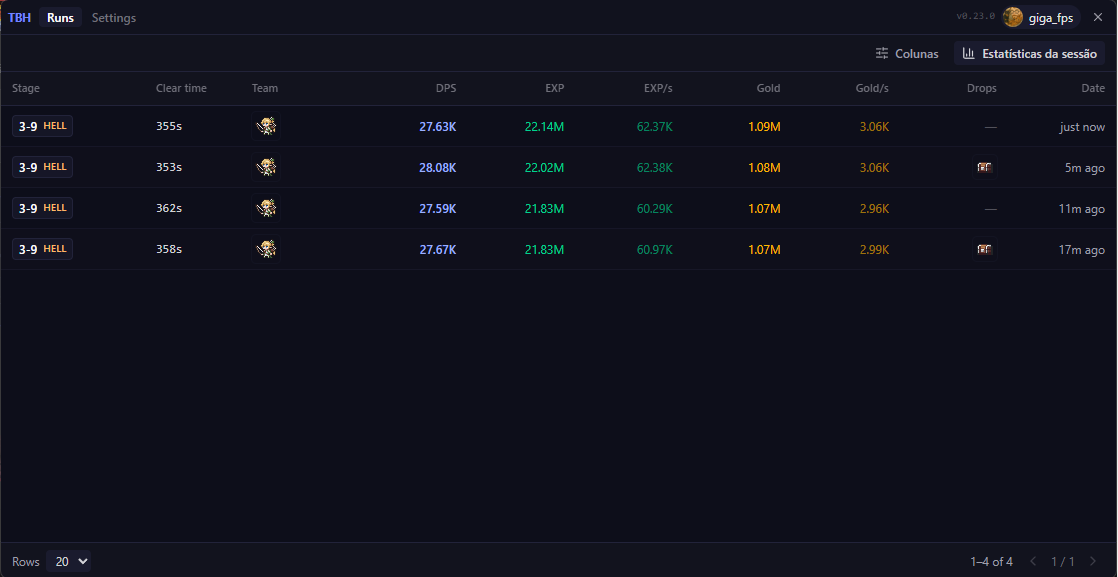
tbh-meter · runs
Run history
Every clear is saved with full damage, gold and XP. Reopen any past run.
tbh-meter · tracker
On cooldown
Lv62
2-9HELL
3-7 HE3-8 HE+9
READY
Lv65
3-9HELL
1-5 HE2-4 HE+10
6:12
Lv50
1-9NIGHTMARE
2-1 NI3-2 NI+12
11:08
History
just nowLv501-9NIGHTMARE11:08
5m agoLv653-9HELL6:12
Blue-Chest Tracker
It reads the blue-chest drop, runs the 12-minute timer, and pings you when it is ready. Zero clicks.
See every stage on the Stage Boxes pageTBH Meter
- Detects the drop from the game
- Starts the timer automatically
- Survives game and app restarts
Manual trackers
- You click a button on every drop
- One missed click breaks the route
- No connection to the game
tbh-meter · ranking
3-9TORMENT
kkrios0:41.21.24M
2ShadowFox0:43.81.19M
3Mei.0:45.01.11M
4bauhunter0:48.61.02M
Installing
setup · 3 steps
- 1>Download
tbh-meter-Setup-<version>.exewith the button above, or grab it from the releases page. - 2>Run the installer. SmartScreen may warn you because the app is not code-signed yet: click More info, then Run anyway.
- 3>Launch the TBH Meter. Next time you play, it attaches on its own and starts tracking. Done.
Read-only by design
The meter only reads game data. Run history and settings live in the meter's own folder, completely separate from the game's files.
- ✓Never writes to the game
- ✓Never modifies files or saves
- ✓Never injects code into the process
- ✓Never plays the game for you
Know your damage.
Disclaimer
The TBH Meter is an unofficial, fan-made tool and is not affiliated with or endorsed by the developer of Task Bar Hero. While the meter is strictly read-only, we cannot speak for how the developer treats third-party tools. Use it at your own risk: we are not responsible for any account action, suspension, or ban that may result from using it.